
Conflict of Interest (COI)
At the University of California, integrity and impartiality are foundational in all its business dealings. In line with PPSM-82: Conflict of Interest, the University requires that any personal or financial interests held by employees, contractors, or suppliers do not compromise—or even appear to compromise—the purchasing decisions of the University.
What is a Conflict of Interest?
A Conflict-of-Interest (COI) review is required per UC policy if the proposed agreement with the entity includes one or more of the following:
- Is a current UC employee or a business owned by one.
- Is a former UC employee (or owned by one) who separated within the last 2 years.
- Is a near relative* of a UC employee or a business owned by one.
- Is a business where a UC employee or near relative* owns/controls ≥ 10%.
- Will pay any UC employee in connection with the transaction.
*Near relatives include, but not limited to: spouse, domestic partner, child, parent, sibling, in-law equivalents, domestic partner’s relatives, and step-relatives in the same relationships.
When is a COI Form Required?
If a supplier answers “yes” to any of the criteria above while completing their PaymentWorks registration, PaymentWorks will automatically flag a potential conflict of interest and prompt the supplier to complete the COI PowerForm.
The COI PowerForm Process

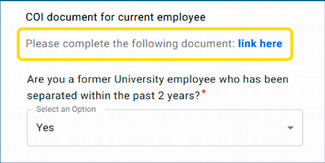
While completing the PaymentWorks registration, if the supplier meets any of the criteria listed above, they will receive the following prompt and link.
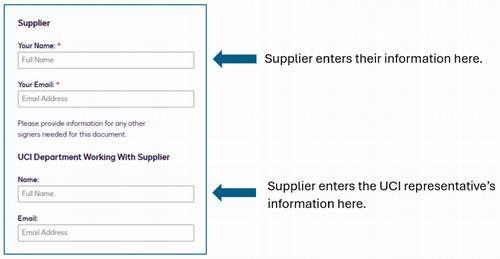
After opening the COI PowerForm link, the Supplier will need to provide their name and email, as well as the name and email of the UCI department representative. IMPORTANT: If the UCI department’s information is not included, the DocuSign will be voided and need to be resubmitted.
The supplier will then receive a DocuSign link and will need to complete Section A of the COI form.
A training video on how to complete the COI form can be found here.
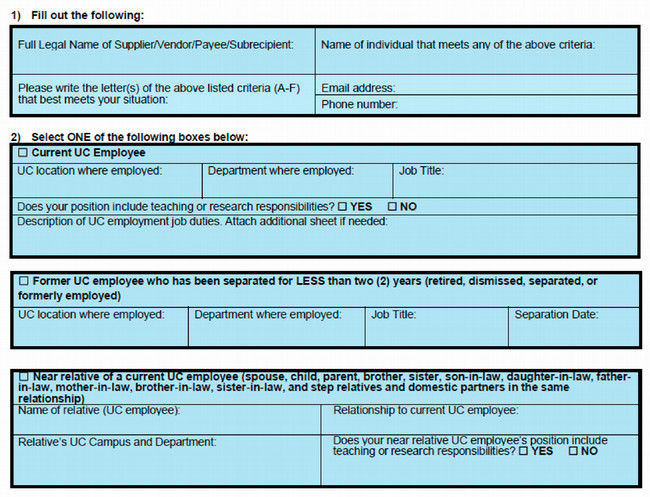
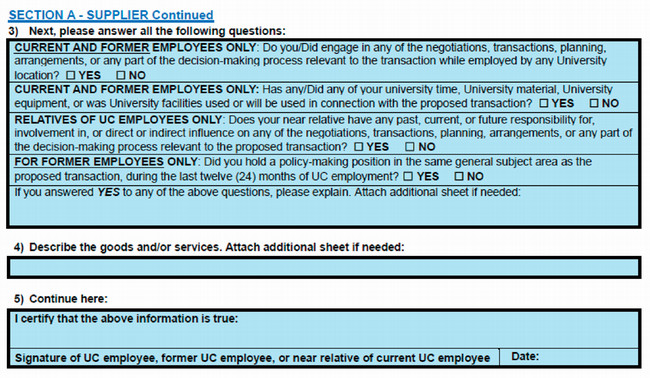
The DocuSign is then automatically routed to the UCI department representative who will need to complete Section B.
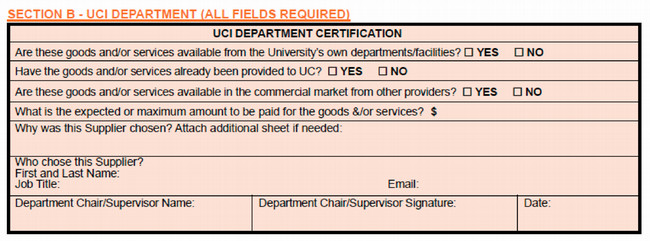
Did you receive a DocuSign envelope but it needs to be signed by someone else in your department? You can reassign it to the correct UCI department representative by clicking “Assign to Someone Else” after opening the envelope.

After the Supplier and the UCI department have completed their sections, the form will route to Procurement Services for review. If the form is missing any information, Procurement Services will reach out for clarification.
Once reviewed and approved by Procurement Services, a copy of the completed form will be sent to the UCI Vendor Coordinator and all signing parties. The Vendor Coordinator will then proceed with the next steps of the onboarding process.
Subawards & Research-Related COI
For information on COI requirements for subawards and research collaborations, please visit UCI Office of Research Conflict of Interest.
Related Links
- UC Policy – PPSM-82: Conflict of Interest
- UC Irvine Office of Research Conflict of Interest (in Research)
- Vendor Onboarding User Guide with PaymentWorks
- Training Video
Questions?
Please submit any questions through ServiceNow: Submit Request.